
D365FO Financial Report Designer Access Issue Fix – Dev VM
“If you’re facing a D365FO Financial Report Designer access issue or internal server error in your dev box, this guide will help you fix both
Error 1: “Connection attempt failed. User does not have appropriate permissions to connect to the server.”
Error 2: “An error occurred while processing the request. (InternalServerError) <“Exception has been thrown by the target of an invocation.”, “The remote server returned an error: (500) Internal Server Error.”>”
These are two of the most common issues when dealing with Report Designer and Financial Reporting in dev environments. In this post, I’ll walk you through how I fixed both by resetting the Financial Reporting Datamart and restarting the MR services.
📋 Table of Contents
- 🚫 D365FO Financial Report Designer Access Issue
- ✅ The Fix: Datamart Reset
- 🔎 Verifying the Fix via SQL Query
- 🎓 Learnings
- ✨ Conclusion
🔍 Pre-Checks Before Resetting Datamart
Before you jump into a reset, make sure you:
- ✅ Confirm the user is assigned one of the following roles in D365FO:
System Administrator,Budget Manager,Chief Financial Officer,Financial Controller,Accounting Manager, or has theLedgerViewAccountduty - ✅ Attempt to open a report under General ledger > Financial reporting
- ✅ Wait at least 10-15 minutes after assigning roles to allow user sync
🚫 D365FO Financial Report Designer Access Issue
Even though the user had the System Administrator role in D365FO, Report Designer refused to connect. On top of that, I hit a second wall with an Internal Server Error when trying to generate financial reports.
✅ Fixing the D365FO Financial Report Designer Access Issue with a Datamart Reset
Here’s the step-by-step solution I followed to reset the Financial Reporting Datamart using PowerShell and Microsoft guidance.
⛔ Step 1: Stop Services

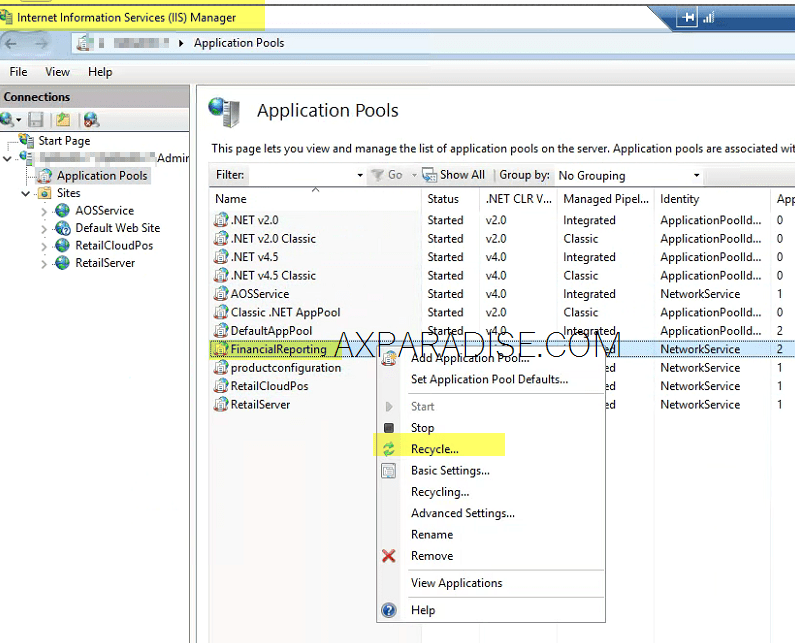
🔁 Step 1.1: Recycle App Pool
⚙️ Step 2: Run the Datamart Reset via PowerShell
Open PowerShell as Administrator, then run the following commands:
cd "K:\MROneBox\MRInstallDirectory\Server\MRDeploy"
Import-Module .\MRDeploy.psd1

Reset-DatamartIntegration -Reason OTHER -ReasonDetail "User access issue on Dev VM"
Note: If you try -SkipMRTableReset and it throws an error, just omit that parameter.
🔄 Step 3: Start Services
Refer to the image attached under Step 1 above if you need help visualizing the start services step.🔁 Step 4: Recycle App Pool
Refer to the image attached under Step 1.1 above if you need help visualizing the app pool recycle step.📊 Step 5: Test Access
- Run Report Designer as Administrator
- Use the following URL:
https://<yourdev>.cloudax.dynamics.com/mi=FinancialReports&cmp=?Wait 5–10 minutes after reset to allow the initial sync to complete.
🔎 Verifying the Fix via SQL Query
To make sure the Financial Reporting entities were synced properly, I ran this query on the FinancialReporting DB:
SELECT ReaderObjectName, WriterObjectName, LastRunTime, StateType
FROM Connector.MapsWithDetail WITH (NOLOCK)
📈 What to Look For:
StateType = 5indicates successful syncLastRunTimeshould be recent
Example Output:
| ReaderObjectName | WriterObjectName | LastRunTime | StateType |
|---|---|---|---|
| AX 2012 Dimensions | Dimension | 2025-05-29 20:01:56.970 | 5 |
| AX 2012 Companies | Organization | 2025-05-29 20:10:03.117 | 5 |
| AX 2012 Accounts | Account | 2025-05-29 20:10:03.867 | 5 |
🎓 Learnings
- Datamart sync issues can cause both connectivity and runtime errors.
- PowerShell-based reset is a safe and effective fix.
- Verifying the fix via SQL.
✨ Conclusion
These steps saved me hours of frustration and a potential VM rebuild. Hope this helps someone else running into the same issues with Financial Reporting on a D365FO dev box. Feel free to drop comments or share if this worked for you too.
📚 Reference: Official Microsoft Guide – Unable to Connect to Financial Reporting Server
I hope this article helped you implement asynchronous REST API integration with HTTP requests and retry logic in D365FO (X++) for Dynamics 365 Finance and Operations. Don’t forget to share this article if you found it useful! You may also want to check out our guide on converting strings to enums with
Convert string into enum str2enum in x++.

 Facebook
 Linkedin
No Comments